TIDAL Music Videos: What They Are and How to Watch
Them
Yes, TIDAL has music videos, and you watch them in the same app and web player where you stream audio. TIDAL's help center says the service offers over 650,000 items in its video catalog. That count covers music videos, short docs, movies, live concerts, events, and original shows and podcasts. You do not need a separate app or a second login.
A TIDAL music video is a video attached to an artist or a track inside TIDAL's catalog. It appears on the artist page next to albums, singles and playlists, so you can move from listening to watching without leaving your library. Not every song has a video, and that is true on every streaming service.
This guide explains why the video side of TIDAL is worth your attention, how to find and play videos step by step, how TIDAL compares with YouTube for watching, and what to check when a video you want is missing. At RIKIO ROCKS we follow the electronic dance music scene every day, so the examples lean toward DJs, producers and live sets.
Why TIDAL music videos matter for music fans
TIDAL music videos matter because they put visuals, live performances and extra content inside the same library you already use for listening. You get one search box, one set of favorites and one account for audio and video.
What the video catalog contains
TIDAL's catalog goes beyond clips for singles. Based on the help center description, the video library breaks down like this:
|
Content type
|
What you get
|
|
Music videos
|
Official clips tied to tracks and artists
|
|
Short docs
|
Brief documentary-style films about artists and music
|
|
Movies
|
Feature-length films
|
|
Live concerts and events
|
Recorded performances and event coverage
|
|
Original shows and podcasts
|
Programs made for the platform
|
This mix is the real answer to whether TIDAL does music videos. It does, and it also works as a small video service for music culture.
TIDAL is a music service first, but its video catalog is large enough to use as a real viewing destination.
Why this matters for EDM fans
Electronic music is a visual culture. Light shows, LED walls, stage design and crowd energy are half of what makes a set memorable. A recorded concert or a polished video often tells you more about an act than the audio alone.
Videos are also a good discovery tool for scenes you cannot visit in person. You can watch how an artist performs before you buy a festival ticket. You can also follow a track you like back to the visual world its producers built around it.
How to watch music videos on TIDAL
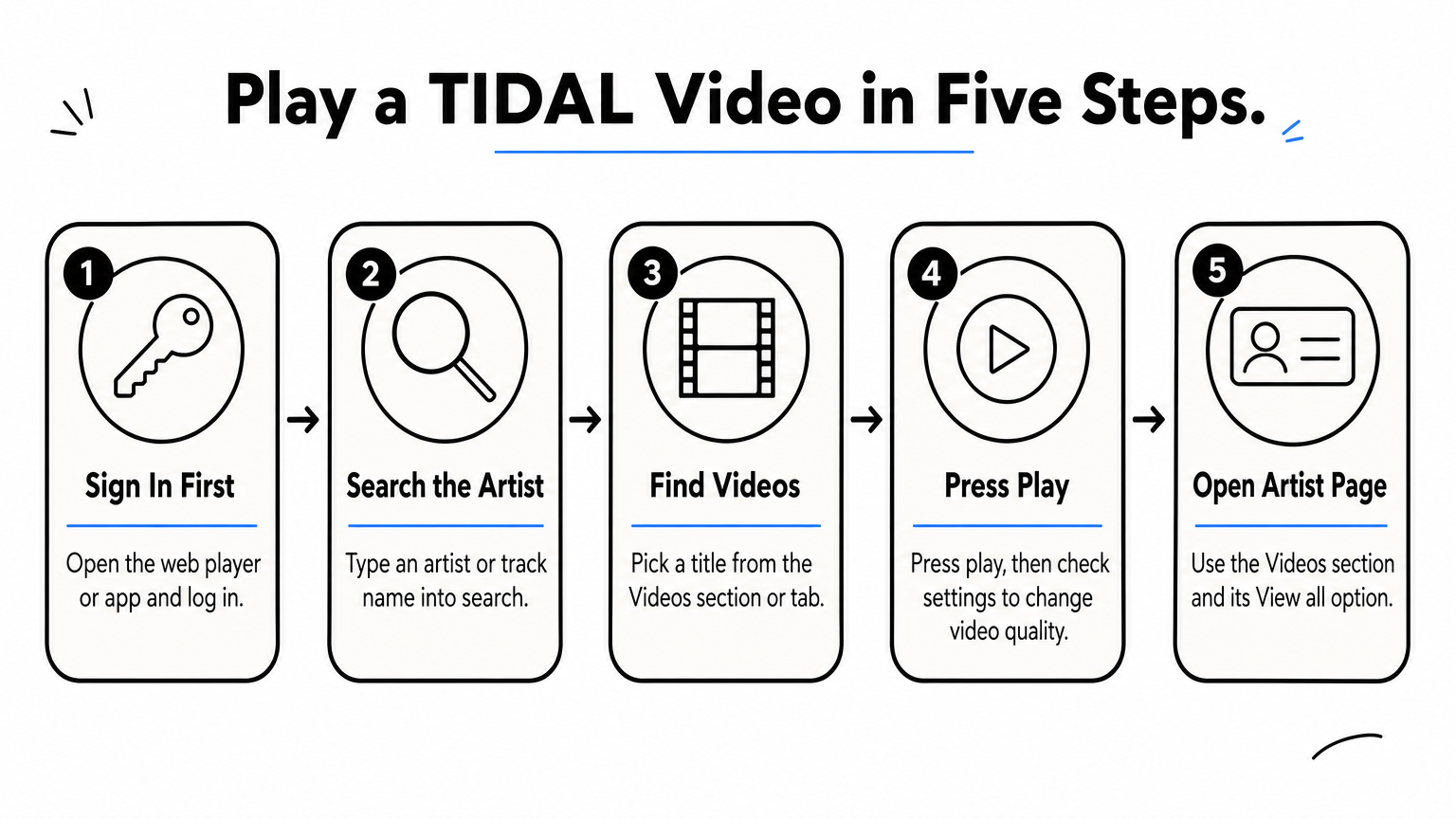
You watch TIDAL music videos by finding a video in search or on an artist page and pressing play, using a signed-in TIDAL account on the app or the web player. The steps below work as a general path, though menu labels can shift between app versions.
Steps to find and play a video
- Sign in to TIDAL on the web player at tidal.com or in the mobile or desktop app.
- Type an artist or track name into search.
- Look for a Videos section or tab in the results, then pick a title.
- Press play. Check your settings if you want to change video quality.
- Open the artist page if you want everything by that act, since artist pages list a Videos section with a "View all" option.
Check your current plan on TIDAL's own plan page before you subscribe, because pricing and tiers change. TIDAL's help center is the place to confirm what your plan includes.
Search for the artist, then open the Videos section on the artist page. That is the fastest route.
Avoid name clashes in search
Generic search terms can mislead you. If you search only for the word "video" on TIDAL, you land on an artist page for a Polish rock band literally named VIDEO. Search for a specific artist or track, then use the Videos filter or section. Add the track title to the artist name when a DJ has a common stage name.
Use My Video Mix for easy viewing
TIDAL also has a feature called My Video Mix, which has its own article in the help center. It is a ready-made stream of videos, so you can press play and let it run without choosing each title. Open TIDAL's help center article for the current steps to find it in your app. Treat it as the lean-back option once you have built up favorites.
TIDAL music videos versus YouTube
For pure choice, YouTube holds more music video content, and most of it costs nothing. TIDAL wins when you want videos inside a library that also holds your albums, playlists and favorites. Pick based on what you want to do, not on brand loyalty.
Where each one is stronger
YouTube is the default home of official video premieres and fan uploads. It also covers live sets, remixes and bootlegs that never reach a streaming catalog. TIDAL's own channel there shows how the company uses it: the channel promotes its SESSIONS performance series, which presents established and up-and-coming artists.
TIDAL is stronger as a single, organized library. Videos sit on artist pages, and the audio is a click away. You are not scrolling through comments or sorting official uploads from copies.
A simple way to decide
- Use YouTube to catch a new release the day it drops, or to find a rare live set.
- Use TIDAL when you want videos beside the albums and playlists you already follow.
- Use both if you follow EDM closely, since each one fills gaps in the other.
YouTube is bigger for discovery. TIDAL is tidier for a music library with video attached.
Common questions about TIDAL music videos
Most questions about TIDAL videos come down to what is available, what it costs and what to do when something is missing.
Does every song have a video?
No. Many tracks have no video at all, especially independent releases and older remixes. Artist pages show only the videos that exist in the catalog, so an empty Videos section means TIDAL has none for that act.
If a video you saw elsewhere is missing, search by exact title, then check the artist page for alternate versions. Live performance versions often carry their own title, such as a TV performance or an "Official HD Video" label.
Who owns TIDAL, and does that change anything?
TIDAL launched under Jay-Z in 2015, but today Block, the company formerly known as Square, owns it, after buying it in 2021. Ownership does not change how videos work for you. What matters is the plan you hold and the catalog available in your region.
What about TIDAL's AI music policy?
TIDAL has announced that it will reject and remove tracks it identifies as entirely AI-generated. The policy covers recordings delivered to its catalog. It does not change how you watch videos. Music made with AI as an assistive tool, such as for mixing or mastering, stays eligible.
If a video is missing, assume it is not in the catalog before you assume something is broken.
Where to go next
TIDAL music videos are real and easy to reach. Sign in, search an artist, open the Videos section, and use My Video Mix when you want playback without choices. The catalog of over 650,000 items covers videos, concerts, short docs, films and shows, so there is more to explore than clips alone. Use YouTube alongside it for premieres and rare sets.
Once the screen time is done, you may want something to play while you move. Our own CARDIO HITS 2026 playlist on Spotify is built to keep a workout going, so you can switch from watching to training without a break.
6